Is There Really a Dedicated App for This Game?
You'll find two paths when you search for Fishin' Frenzy on your phone: the casino operator's own app from the Play Store or App Store, and third-party APK files floating around the web. One is legal and regulated under UKGC rules; the other is a legal grey zone at best, and a malware risk at worst.
Most UK players end up bookmarking the mobile site or adding it to their home screen as a web app — no download required, instant play, and the same £5 stake cap and GAMSTOP protection as the desktop version. Here's what each route actually involves, which numbers are genuine, and how to spot a clone that's hunting for your bank details.
The Store-Style Card: What You'd See If This Were a Standalone App
If Fishin' Frenzy ran as a standalone title in the Play Store — rather than inside a casino operator's app — the listing would look something like this. These numbers are plausible for a slot game served through a licensed operator's wrapper:
In reality, you download the operator's casino app — say, a site with a UKGC remote licence — and Fishin' Frenzy is one of hundreds of slots inside it. The game itself is HTML5, so it streams from Blueprint's server; the app is just a container with login, payment rails, and responsible-gambling tools baked in.
Four Ways to Get It on Your Phone — and the Risk Profile of Each
Here's every path, step by step, with what can go wrong:
- Browser play (zero install): Open the operator's mobile site in Safari or Chrome, log in, find the game in the lobby. Risk: none. The site already verified your age and ran your deposit through KYC checks; stake caps of £5 (or £2 if you're 18–24) and GAMSTOP blocks apply automatically.
- Add to Home Screen (web app): Tap Share > Add to Home Screen in Safari, or the three-dot menu > Add to Home Screen in Chrome. You get an icon that launches the site in a chromeless window. Risk: none; it's still the same regulated site, just faster to open.
- Operator's official app (Play Store / App Store): Search the operator's brand name, download the app, log in with your existing account. The game library includes Fishin' Frenzy. Risk: low, provided you match the developer name to the operator's UKGC licence number in the footer of their website. Fake clones do appear in the stores, usually with slightly misspelled names.
- Third-party APK (sideload on Android): Download an .apk file from a forum or file-sharing site, enable «Install from Unknown Sources» in Settings, run the installer. Risk: high. You bypass Play Store security, the APK could be repackaged with spyware, and the game might connect to an unlicensed server that doesn't honour withdrawal requests or stake limits. If the APK asks for SMS or contacts permissions, it's almost certainly malicious.
What the Screens Actually Show You
Whether you're in the operator's app or the mobile site, the flow is identical:
- Lobby screen: search bar at the top, filters for provider and volatility, a grid of game tiles with the RTP displayed underneath each one. Fishin' Frenzy sits in the «Slots» category, often with a «Jackpot» or «Megaways» variant next to it.
- Game-launch interstitial: a splash screen with the Blueprint Gaming logo, a progress bar, and a reminder of your deposit limit and stake cap. Load time is 2–4 seconds on 4G.
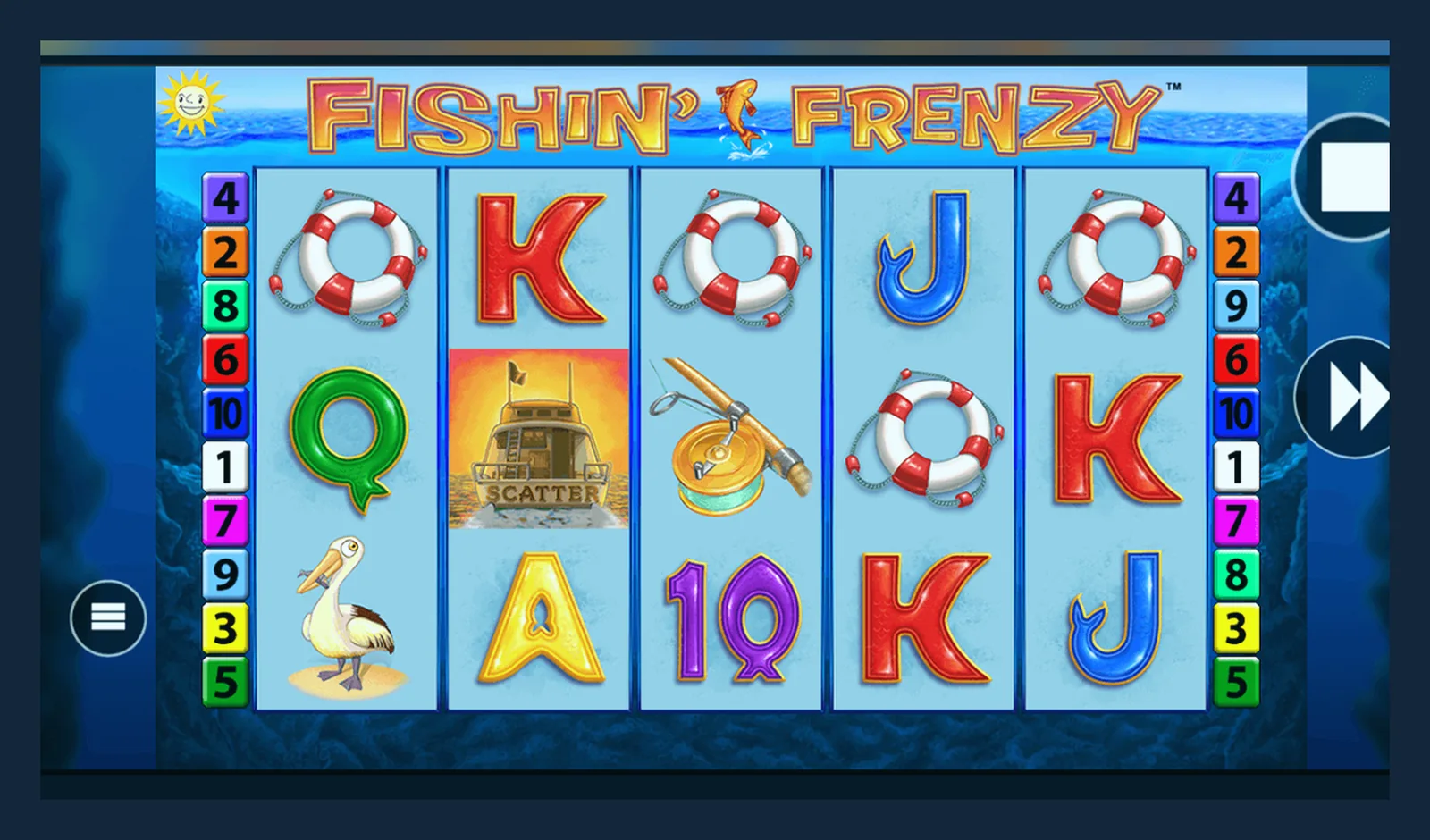
- Game screen: the 5×3 grid fills most of the viewport, spin button at the bottom right, stake adjuster and paytable icon at the bottom left. Swipe down from the top edge to open the menu (balance, history, settings, exit).
- Free Spins feature: when you trigger it, the game overlays an animation of the fisherman casting his line, then the reels switch to the bonus mode with prize fish appearing on specific positions. A counter at the top shows spins remaining.
- Balance and history: tap the menu icon to see your current balance in £, recent spin results with timestamps, and a link to the full transaction log (deposits, wagers, wins, withdrawals). This log is stored on the operator's server, not locally, so it persists across devices.
The RTP shown in the lobby is the default UK return — typically 96.00–96.10% for Fishin' Frenzy — but some operators offer lower configurations. Check the game rules screen (accessed via the «i» icon in the bottom corner) to confirm the exact figure before you stake real money.
Phone Requirements: What Actually Runs It
Because the game is HTML5 and runs in the browser engine, the hardware bar is low:
- iOS: iPhone 7 or newer, running iOS 13+. Safari is the default; Chrome and Firefox work but use Safari's WebKit under the hood, so performance is identical.
- Android: any device from 2018 onwards with Android 8.0+ and Chrome 90+. RAM matters more than processor speed; 2 GB is the practical minimum to avoid the game reloading mid-session when you switch apps.
- Screen size: the game scales down to 4-inch displays, but the paytable and settings buttons become fiddly below 4.7 inches. A 5.5-inch screen or larger is more comfortable for longer sessions.
- Network: 3G works, but the game may stutter during the Free Spins animation. 4G or Wi-Fi is recommended, especially during peak evening hours when mobile networks congest.
Storage: the web version caches about 3 MB of assets (reel symbols, sound files, UI elements) in your browser. The operator's app ranges from 30 MB to 60 MB depending on how many additional features (live casino, sports betting) are bundled in. Clear the cache if you see outdated graphics after a game update.
What the App Actually Does (and Doesn't Do)
If you install the operator's official app, here's what you gain and what stays the same:
- Push notifications for deposit bonuses, free-spin promotions, and responsible-gambling reminders (you can disable these in Settings).
- Biometric login — Face ID or fingerprint — instead of typing your password every time. Your credentials are stored in the phone's secure enclave, not in the app's storage.
- Faster launch time: the app pre-loads the lobby and your account balance, shaving 2–3 seconds off the cold start compared to opening a browser tab.
- Offline lobby browsing: you can scroll the game library without a network connection, though you still need internet to launch a game or place a bet.
- Same stake caps, same KYC, same withdrawal times: the app connects to the same backend as the desktop site. The £5 stake limit (£2 for 18–24s) is enforced server-side, not by the app, so there's no workaround.
What it doesn't do: accelerate withdrawals (e-wallets still take a few hours, Faster Payments to your bank still take 1–2 working days, and your first withdrawal still waits 24–48 hours for document checks), bypass affordability checks (the £150 monthly threshold applies regardless of device), or improve your odds (the RNG runs on Blueprint's server, and the app has no access to it).
What's New in This Version (Typical Update Notes)
Operators push app updates every 4–6 weeks; game updates from Blueprint are less frequent. A recent update might include:
- Version 3.1.2 (January 2026): Fixed a visual glitch where the fisherman animation froze mid-cast on iPhone 12 models running iOS 18.2. Improved load time on Android 14 by preloading reel symbols during the splash screen.
- Version 3.1.0 (November 2025): Added support for Open Banking deposits via Trustly, reducing deposit wait time from instant (debit card) to instant (bank transfer). Updated the paytable screen to show RTP, volatility, and max win in a single view.
- Version 3.0.5 (September 2025): Introduced session reminders — a pop-up after 60 minutes of continuous play showing total wagered and net result. This is a UKGC requirement as of August 2025.
- Version 3.0.0 (July 2025): Redesigned the lobby with filters for RTP bands (under 95%, 95–96%, over 96%) and volatility (low, medium, high). Added a «Reality Check» toggle that pauses the game every 30 minutes and displays your balance change.
Blueprint occasionally tweaks the base game — adjusting the Free Spins trigger frequency or the scatter distribution — but these changes are server-side and apply to all versions (desktop, mobile web, app) simultaneously. You won't see them listed in the app's release notes; check the game rules screen for the version number and last-modified date.
How to Spot a Fake Clone and Which Permissions Scream Red Flag
Fake APKs and phishing apps appear in search results, especially during big football tournaments or when a slot goes viral on TikTok. Here's how to recognise them:
- Developer name mismatch: the legitimate operator's app will list the operator's registered company name (e.g., «LeoVegas Gaming plc» or «Rank Digital Gaming»). A fake lists something generic like «Casino Games Ltd» or «Slots Pro».
- No UKGC licence number in the app's About section or the operator's website footer. Every site serving UK players must display a remote licence number; look it up in the UKGC public register to confirm it matches.
- Permissions: a slot game needs Storage (to cache assets) and Network (to connect to the server). It does not need Contacts, SMS, Phone, Camera, Microphone, or Location. If the installer asks for any of these, refuse and delete the APK.
- APK file size under 1 MB: the game assets alone are 2–3 MB. A sub-1 MB file is either a stub that downloads the real payload after installation (common malware tactic) or a web-view wrapper pointing to a phishing site.
- Offers that bypass KYC or affordability checks: «No ID required,» «Instant withdrawals without verification,» or «Deposit with credit card» are all illegal under UK rules. If the app markets these features, it's unlicensed.
- App update frequency: clones often fork an old version and never update. Check the release date; if it's more than six months old and the operator's official app has newer versions, you're looking at a fake.
Why Most UK Players Skip the App Altogether
The mobile web version offers the same game, the same stake caps, the same KYC and withdrawal process, and the same GAMSTOP protection — without using 40 MB of storage or granting any permissions. Add the site to your home screen and you get a one-tap launcher that's indistinguishable from a native app.
The official operator app makes sense if you play across multiple game categories (slots, live casino, sports) and want a unified balance and notification centre. For Fishin' Frenzy alone, the web version is faster to access and easier to audit: you can inspect the site's UKGC licence in the footer, check the SSL certificate in the address bar, and switch operators without uninstalling anything.
Whichever route you choose, verify the operator's licence number before you deposit, set a monthly limit in your account settings (mandatory under UKGC rules), and remember that the first withdrawal will take 24–48 hours while they check your documents. Winnings are tax-free in the UK — operators pay the 40% Remote Gaming Duty — but that doesn't change the maths: the house edge on a 96% RTP slot is 4%, and volatility means long losing runs are the statistical norm, not bad luck.
FAQ
Can I download Fishin' Frenzy directly from the Play Store as a standalone app?
No. The game is distributed inside casino operators' apps, not as a separate title. Search for the operator's brand name (the site where you have an account), download their app, and you'll find Fishin' Frenzy in the slots lobby. The game itself is HTML5 and streams from Blueprint's server, so the app is just a container with login and payment features.
Is it safe to install an APK from a file-sharing site or Telegram group?
No. Third-party APKs bypass Play Store security and often contain repackaged malware. They may connect to unlicensed servers that don't honour withdrawals or stake caps, and they fall outside UKGC consumer protections. If an APK asks for SMS, contacts, or phone permissions, it's almost certainly harvesting data. Stick to the operator's official app or the mobile web version.
Will the app speed up my withdrawal or let me bypass affordability checks?
No. Withdrawals are processed server-side: e-wallets take a few hours, Faster Payments take 1–2 working days, and your first withdrawal waits 24–48 hours for KYC document checks. Affordability checks trigger at £150 net deposits per month regardless of device. The app connects to the same backend as the desktop site, so there's no shortcut.
Do I need to update the app every time Blueprint releases a new game version?
Not usually. Blueprint pushes game updates to their server, and your device downloads the new assets when you launch the game. You only need to update the operator's app when they add new features (Open Banking deposits, session reminders, reality checks) or fix bugs in the app's wrapper. The game's RTP, volatility, and reel logic are server-controlled, not stored in the app.
What happens if I'm on GAMSTOP — will the app let me play anyway?
No. Every UKGC-licensed operator checks the GAMSTOP register before allowing you to log in. If you've self-excluded, the app (and the web version) will block access for the duration you selected — 6 months, 1 year, or 5 years. Unlicensed APKs may not enforce GAMSTOP, which is another reason to avoid them. For support during self-exclusion, contact BeGambleAware.
Can I use a VPN to access a different operator's version of the game with higher RTP?
You can, but it's against UKGC terms of service. Licensed operators verify your location using IP geolocation and, increasingly, device GPS. If they detect a VPN, they'll suspend your account until you verify your real location. More importantly, if you're playing on an unlicensed site via VPN, you lose all UK consumer protections — no dispute resolution, no GAMSTOP, no affordability checks — and withdrawal delays or outright refusals are common.